
Football clubs and academies
Sign in for football clubs, academies and training grounds
On a weekday a club is a building full of people nobody has counted: two or three squads and their coaches, a parent at the door, a scout, a referee on a course, the pitch contractor and the caterer for Saturday. The kiosk is the signing in book on an iPad by the door. It records who came in and when and what they accepted, tells your office in Teams or Slack, and puts everyone who signed in on one list you read from a phone when the alarm goes, or when a player is not where he should be.
Sign in on a demonstration kiosk, then open the fire roll call on your phone. Do not enter real details: everything typed is deleted within the hour.
From £599 setup and £150 a month plus VAT, iPad and stand included.
Who this is for
A ground with an academy in it on a Tuesday
Non-league and National League clubs with a scholarship programme or an academy on the ground, Category 3 and 4 academies, and training grounds with a reception. The same shape turns up at rugby and cricket clubs. What they have in common is a door that a hundred teenagers, their coaches, a few parents and a handful of tradesmen come through every weekday, and a paper book by it that nobody signs on the way out.
The afternoon it matters is the one when a player who was in the building is not. The first question is whether he came in at all, the second is when he was last seen, and a paper book answers neither quickly. The other is the fire alarm during a session, with a coach on the car park trying to count three squads from memory.
What the documents say
The rulebooks, the FA’s policy and the Fire Safety Order, read for a door
Three documents reach the door of a club. The Premier League and EFL Youth Development Rules bind the professional clubs and ask Development Centres for an attendance record of players. The FA’s safeguarding policy binds the affiliated game and asks for no register at all. The Fire Safety Order binds every ground as a workplace. None of the three asks for a sign in book, and this page does not pretend otherwise.
| What the source says | What the record shows | What stays with the club |
|---|---|---|
| Premier League Youth Development Rules 2025/26, Rule 138“Clubs which operate Development Centres shall keep an attendance record, proof of home address (and any subsequent change(s) of address) and date of birth of all players who participate in coaching sessions thereat, which it shall provide to the League and/or The Football Association on request.” The EFL’s Rule 136 is the same clause. | Who came into the building and when, with the squad they typed, and when they left. It is not the attendance record the rule describes: who took part in a coaching session is known on the pitch, not at the door. | The attendance record, the addresses and the dates of birth. Keep those where you keep them now; the sign in record sits beside them. |
| Football’s Safeguarding Children Policy, v1.4, October 2025The FA’s policy sets out the safeguarding standards the affiliated game signs up to. We read it in full and it asks for no register, no sign in book and no visitor record. Safeguarding is DBS checks, trained adults and a welfare officer, not a book by the door. | Nothing the policy asks for. What the record gives a welfare officer is one place to look first on the afternoon a player is not where he should be: whether he came in, when, and whether anyone signed him out. | Every safeguarding judgement. The kiosk makes none, and a record of who signed in does not make a club compliant with anything. |
| Fire Safety Order 2005, Article 15The responsible person must “establish and, where necessary, give effect to appropriate procedures, including safety drills, to be followed in the event of serious and imminent danger to relevant persons”. | A live list, on a phone at the assembly point, of everyone signed in at the kiosk and not yet signed out: players if they sign in, visitors and contractors. | The fire risk assessment, the procedures and the drills, and anyone who did not sign in: your staff on the rota, and a player who walked past the iPad. |
- Premier League Handbook 2025/26, Youth Development RulesRule 138 is quoted in full. Definition 1.33: a Development Centre is “an establishment operated by a Club in England or Wales for the coaching of Children which is not an Academy”, including pre-academy, junior and senior training centres. Read 21 October 2026.
- EFL Youth Development Rules, season 2024/25Rule 136, the same attendance clause, word for word. Read 21 October 2026.
- The FA, Football’s Safeguarding Children Policy, version 1.4October 2025. Read in full 21 October 2026 for any register, sign in, visitor or evacuation requirement; there is none, and the row above says so rather than quoting a clause that does not exist.
- Regulatory Reform (Fire Safety) Order 2005, Article 15Procedures for serious and imminent danger and for danger areas. Quoted from legislation.gov.uk, read 21 October 2026.
What the kiosk does
The book’s four jobs, done by an iPad at the door
Who is in, and when they came
A player: their name, their squad, the time in and the time out. A visitor: name, who they are from, who they are here to see, the times, and a car registration if you want it. Search by name, squad or date on the dashboard, and export any day to a spreadsheet.
Your words at the door
Site rules, the behaviour you expect of a visitor around young players, where a parent may and may not go: whatever the club writes goes on screen before anybody is signed in. A visitor accepts it every visit; a player accepts it once, on their first tap, and again only when the wording changes. Each acceptance is kept with the person, the time and a fingerprint of the exact text.
One list, on a phone
Everyone signed in at the kiosk and not yet signed out, on a live list a coach opens on a phone from the pitch side or the assembly point. Nobody goes back into the building for a book.
The office told
Each sign in posts to a Microsoft Teams or Slack channel the club chooses: the name, who they are from and who they are visiting. The office sees the scout and the electrician arrive without watching the door.
The visitor management kiosk in fullHow the accepted wording is keptThe arrival message in Teams
Players
One tap each, on the club’s own iPad
The iPad’s first screen on a training day is the squad list: the squads along the top, the names underneath, a first name and an initial each. A player taps their squad, taps their name, and is in. The same tap on the way out signs them out, with five seconds to undo a wrong one. The club’s wording is accepted on the first tap and again only when the wording changes, so a hundred players do not read it twice a day.
The list is the club’s own spreadsheet, pasted into the dashboard at setup and whenever a squad changes. The coach’s phone shows the squad turning green as they arrive and signs the whole squad out from the roll call when the session ends. Outside the hours you set, the iPad shows the visitor form instead, for the function room on a Saturday.
What is built, what is in pilot, and how a request becomes part of the kiosk
Everyone else
A visitor signs in the way a visitor does
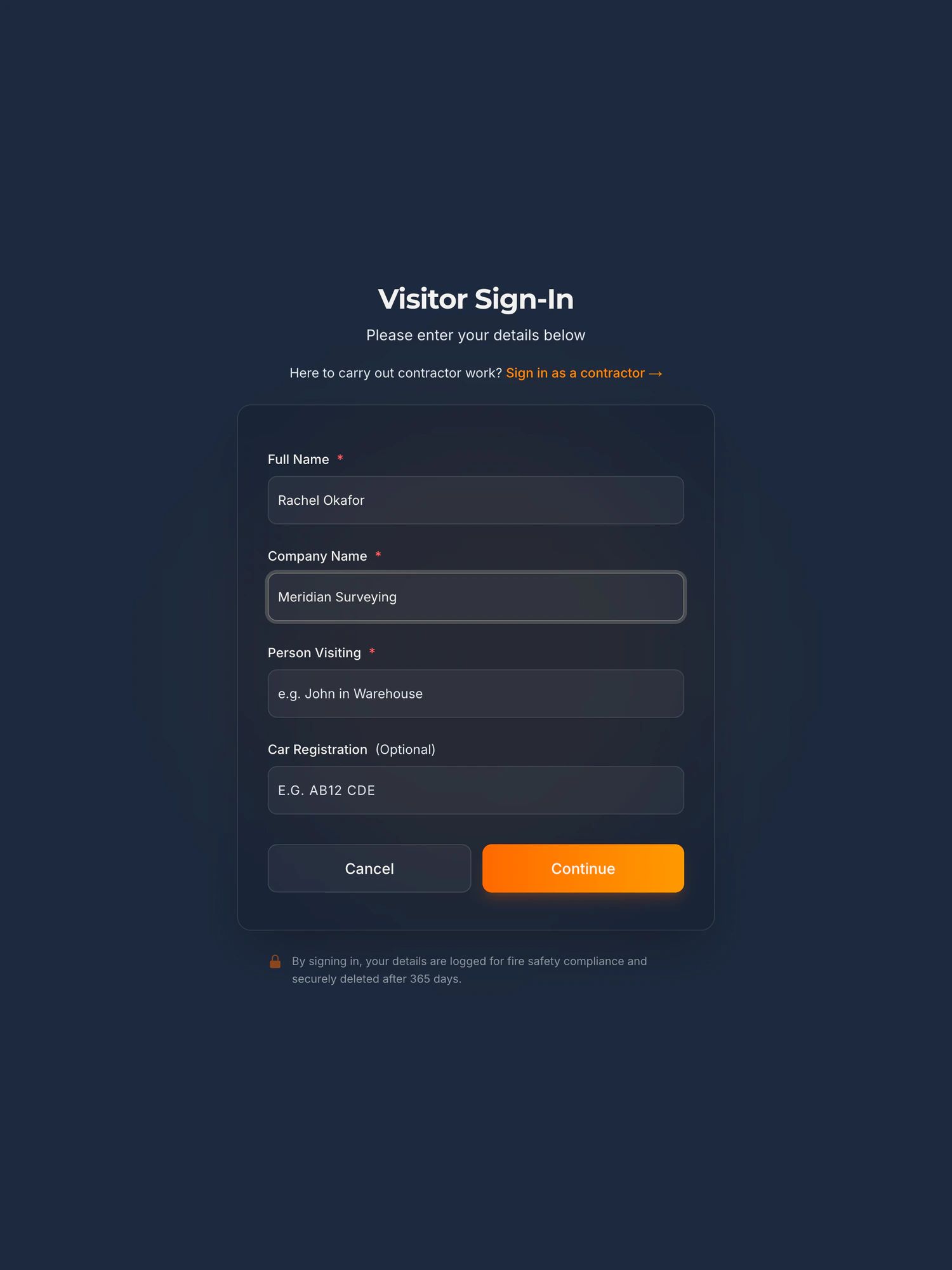
Under the squad list are three buttons: Visitor Sign In, Visitor Sign Out and Delivery. A parent, a scout, a referee on a course or the pitch contractor types a name, who they are from, and the coach or the office they came to see from your staff list, accepts the club’s wording, done. The box for who they are from can be worded for the site, or made optional. Leaving is their own name typed at the iPad, or a coach closing the record from the dashboard.
Tell us how it runs at your ground. How many players a day, in how many squads. Who holds the list and how often it changes. How you know today who is in the building.
See it work
Squad sign in, start to finish, in two minutes
A demo club, every name fictional, and the screens are the ones a club gets. Three players tap in. The coach’s phone fills up. A visiting physio signs in from the buttons underneath. The coach signs the squad out after training, and a fire drill freezes everyone on site, squads and guest.
The player loads from YouTube only when you press play. Nothing is sent to Google before that. What happens when you do.
When the alarm goes
One list for the car park
A coach at the assembly point with three squads, two parents and an electrician somewhere in the stand needs one list, not a book inside the building. The kiosk gives the club the part of that list the rota cannot: who signed in today and has not signed out, on a phone.
- Everyone signed in at the kiosk and not yet signed out, on a live list you open on a phone: an Academy tab with the squads, and a tab for visitors and contractors, with both counted at the top.
- Who each one is from, who they came to see, and when they arrived.
- Your own staff are not on it unless the club loads them as a group of their own. There is no staff sign in by name, so office staff stay on the rota, as they do today.
- A player who walked past the iPad is not on it either. The list is only as good as the habit at the door, which is why signing in is one tap.
- A courier who only uses Delivery Drop-off is logged, but is not signed in and is not on the list.
The roll call, on its ownA free fire drill recordA fire drill on the kiosk, start to finish, on film
See it work
A visitor sign in and a fire roll call, in 100 seconds
Not filmed at a club, and the screens are the same. A visitor signs in on the iPad. The alarm goes. The marshal opens the live list on their phone and reads off who is still on site.
The player loads from YouTube only when you press play. Nothing is sent to Google before that. What happens when you do.
Being straight with you
What it does not do at a club
It is a sign in record, not an attendance register.
It shows who came into the building and when. It does not record who took part in a session, it does not feed a college’s or a provider’s register, and it is not the attendance record the Youth Development Rules ask a Development Centre to keep.
Players tap. Everyone else types.
A player taps their squad and their name. A parent, a scout, a referee or a contractor signs in as a visitor does: full name, who they are from, who they came to see, your wording accepted. The squad list is the one the club pastes in and keeps up to date, and a trialist who is not on it yet signs in as a visitor.
It does not watch a door.
A player who leaves by the side gate without signing out is still on the list until he signs out at the iPad, a coach closes the record from the dashboard, or 23:59 UTC, when anyone still signed in is signed out automatically. The record is one place to look first, not a barrier at the exits.
It asks a visitor who they are from.
The box is labelled Company Name unless the club words it for the site (“Event or organisation”, say) or makes it optional. A parent types “Parent”, a referee types the county FA. A player never sees it: the squad is already known.
It is not for match day.
It is not a turnstile, a ticket scanner or a crowd count, and spectators never sign in. It is for the weekday building: the academy, the offices, the function rooms and the contractors. On a match day the people who use the office door can still sign in at it.
Your own staff are not on the list unless you put them there.
There is no staff sign in by name and password, and office staff stay on the rota, as they do today. A club can load its coaches as a group of their own, so they tap in and out beside the players and are on the same list; nothing makes them. Staff on the roll call proper is a separate pilot, and not built.
Everything else the kiosk does not doStaff on the roll call, in pilotWhere the data lives, and every sub-processor
Before you ask
The questions a head of operations asks first
Does the FA require a club to have a sign in system?
No. Football’s Safeguarding Children Policy asks for no register, no sign in book and no visitor record, and we know of no FA rule that does. The Premier League and EFL Youth Development Rules ask a club with a Development Centre to keep an attendance record of the players who take part in coaching there, and that is a record of participation, not of who came through a door. Where a club gets a reason to know who is in the building, it is usually from its own fire risk assessment, its own safeguarding policy, or the afternoon it could not find a player.
Can a hundred academy players sign in twice a day on it?
Yes. Each one taps their squad and their name on the way in and the same name on the way out, one tap each, no ID card and nothing typed. The club’s wording is accepted once, on the first tap. A club management app keeps a training register on the coach’s phone and does that well today; what it does not do is sign in the parent, the scout or the electrician, and put them on the same list as the players when the alarm goes. That is the gap this fills.
Who can see the players’ names?
People the club gives a dashboard login to, and nobody else. The iPad shows a person their own form and the club’s wording, never a list of who is in. Signing out means typing your own name and confirming one masked match. The arrival message to your channel carries only what was typed. The squad list on the iPad shows a first name and an initial, a second letter when two players share them, so a full list of children’s names is never on display in a public entrance. The full names stay in the dashboard.
A record of a child’s name and times is personal data. How is it handled?
The club is the controller and we are the processor, under a data processing agreement supplied as standard. You set one retention period, from a day to two years with a year as the default, and records are deleted automatically when it runs out. The data is held in the European Union, in Ireland. There is no camera unless the club switches badge photos on, and no photo at all on the platform alone. The security page lists every sub-processor and what we do not have.
We hire the function rooms out. Do those guests sign in?
Yes, as visitors, with the organiser or the duty manager as the person they are visiting, and they are on the same list as everyone else. A courier who only uses Delivery Drop-off is logged but is not signed in and is not on the list.
What about the pitch contractor and the people working in the stands?
Contractors sign in on the same iPad as everyone else and accept your site rules, in your words, about where they may go while players are in. Permits to work, with RAMS and a manager’s sign off before anybody starts, are a module on the same kiosk, in early access: switched on for a site with us involved in the setup, rather than sold self serve.
What does it cost?
The kiosk platform is £150 a month plus VAT for the site, with setup from £599, and the iPad and the stand are included. A second iPad on the same site, at the academy door say, is £50 a month plus £599 setup. Nothing is charged per player or per visitor, and squad sign in is part of the platform, not a module. Loading the squads from your spreadsheet is part of setup.
Also asked of sites like yours
The other things somebody may ask you to evidence
Each of these is a page about one standard, one duty or one visitor, written the same way as this one: what it actually asks for, what an iPad at reception records towards it, and where it does not help.
- GDPR and the visitor book
- CMMC physical security
- List X visitor control
- ITAR visitor log
- Def Stan 05-138 visitor access
- ISO 27001 visitor access
- PCI DSS visitor log
- AEO visitor access control
- CTPAT visitor log
- TISAX visitor management
- TAPA FSR visitor log
- BRCGS visitor control
- BRCGS packaging visitor control
- BRCGS storage and distribution visitors
- BRCGS unannounced audit
- Visitor control non-conformity
- SALSA visitor control
- IFS Food visitor hygiene
- UFAS feed mill visitor control
- GMP visitors in production areas
- GDP wholesale visitor control
- Fire roll call
- Contractor management
- Construction work in occupied premises
- HSE inspection records
- ISO 45001 contractor control
- Visitor NDA sign in
- Visitor record retention
- What a visitor log must contain
- Standards calendar
- Sign in sheet template
- Visitor health questionnaire template
- Contractor induction template
- Permit to work template
- Hot work permit template
- Fire drill record template
Next step
Tell us about the ground, and the squads
Fifteen minutes on the phone. How many players on a weekday and in how many squads, who else comes through the door, which door, and how you count everyone today. We will tell you straight whether the kiosk fits, where the pilot stands, and put a price in writing the same day.
Book a 15 minute callNo visit needed and nothing to install. If it is not a fit we will say so on the call.
Would rather email? ben@noonelite.com
Not the person who signs it off? Send them the one page business case